
PRGRM GUIDE / 4 min read
Review, export, and share
Check your document, preview a sample, and download your full PDF for free.
Review the current document
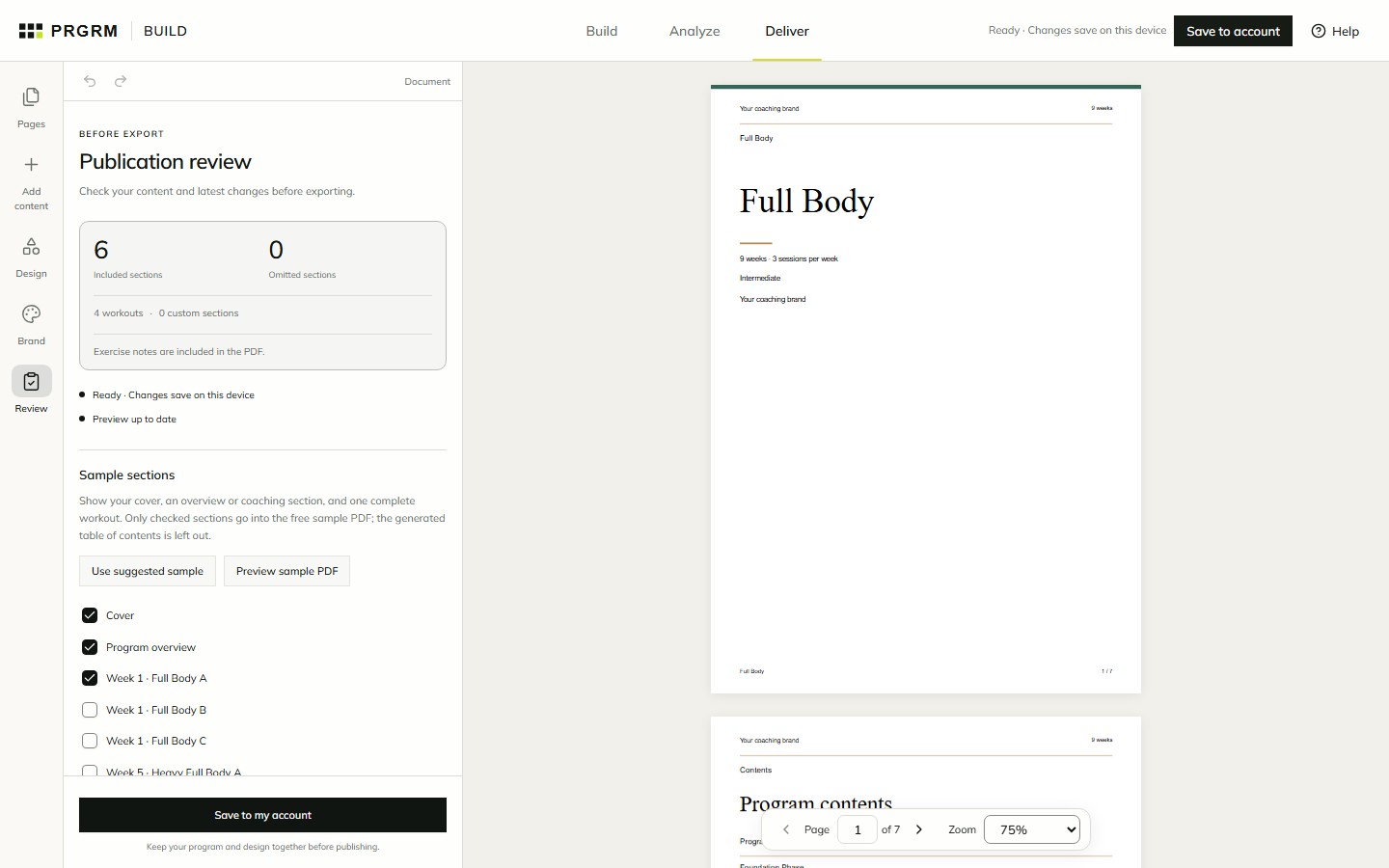
Open Deliver → Review. Check included and omitted sections, workout counts, exercise-note visibility, save status, and whether the preview is up to date.
Resolve any Fix before export issues. Editorial checks are suggestions to review. Read the actual PDF preview to check wording, page breaks, and workout tables; use page navigation and zoom to inspect the detail.
Choose a sample
- Find Sample sections in Review.
- Choose Use suggested sample for a cover, overview or coaching section, and one complete workout.
- Adjust the checked sections, then select Preview sample PDF.
Only checked sections appear in the sample. The generated table of contents is excluded. Review the sample separately from the full document.
Download your PDF
Build, Analyze, and full PDF downloads are free. In Deliver, resolve any blocking issues and generate the current document. ChooseDownload PDF to save the complete file. You do not need a publishing purchase.
Independent export packages are a separate $29 purchase per program, plus applicable tax, and can include XLSX, JSON, sample PDF, and ZIP. Selling a hosted program has no upfront publishing charge.
Saving a program does not make its builder URL public. Share the finished files, or complete a marketplace listing. Continue with Publish and sell a program.